As I often do with games I’m approaching, I built a list and unit builder for Dragon Rampant 2e. I didn’t stop there, though–I also built magic school cards and quest cards. Here’s the link:
https://drive.google.com/drive/folders/1K5P6cyWj4aHWH2pu6lX3u5meGzEwylwS
In that drive you should find anything I’ve built and if I update it, I’ll update it there. Please note: I built these in Microsoft products–I’m unsure how well they’ll work in Google Sheets or other equivalents. You need to use Excel to use the workbook. Google Sheets does not play nice with the formulas used. The PowerPoint also flattens visually, but that shouldn’t be as much of an issue as I included a PDF of the cards.
Without further ado, let’s start the explanations:
Dragon Rampant Second Edition List Builder
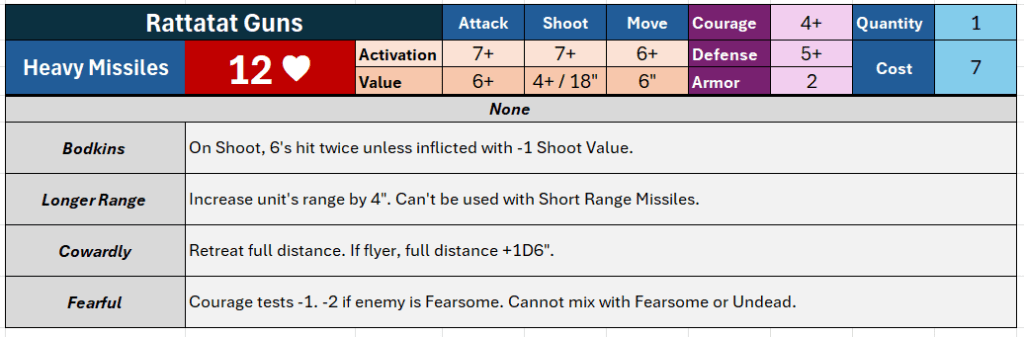
Okay, so this is what it sounds like. It builds lists which output cards like the card above. To print them you’ll want to copy and paste into a Word document set to landscape orientation. Easy enough, I hope. I suppose you could also mess with Excel’s settings to print directly–I have not done this.

Note that there are three tabs–one of which is hidden (Data Validation Drop Downs) by default. Start with the Calculator tab.
Input should be easy:

- Input your unit name. This does not affect anything.
- Use the drop down box here (“Heavy Missiles”) to select the unit’s type. You can also start typing a name and it will autocomplete from the list.
- Enter the quantity of the unit. This allows you to readily have 4 warrior units off one profile, for example.
- Select from the drop down lists what skills you want. Again, it will autocomplete if you type. The descriptions fill in automatically and are my own shorthand. You can edit them in the data tab which I explain farther down.
A few limitations:
- You’ll note the default profile skills are built in just above the skill drop down selections, without any descriptions. I’m assuming players can learn those default skills, as there are not many and they’re effectively core rules. This unit has “None.” In the snapshot below you’ll see a unit with “Wall of Spears.”
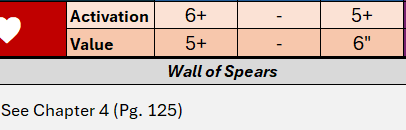
- It will not update the statline based on the skills chosen. So here, the unit’s range is actually 22″, not 18″, because of the “Longer Range” skill.
- I built 18 unit profile slots. If you want to have more than 18 unique profiles you’ll need to open more than one calculator.
- The calculator only allows optional skills per unit. If you’re going beyond this, I consider you a madman. I had to really try to build the four skills into the unit above–my actual Rattatat Guns only have one skill.
- The calculator is not well setup to store multiple lists. I keep a master and copy off new copies for each army.
At the bottom of this post you’ll find an explanation of the other two tabs, including how you can (hopefully easily) edit whatever you want to edit about the calculator, even if you are not an Excel wizard (but especially if you are).
Dragon Rampant Quests and Magic Cards
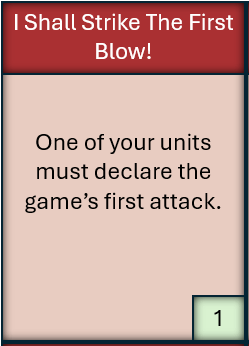
Easy enough. We’ll start with the quest cards. I put all the quests on cards! You can print them out and draft quests or you can just use them as reminders. I like to draft quests, where both players draw five and keep as many of those five as they please. The value of the quest is in the bottom right corner, color coded and marked with a number.
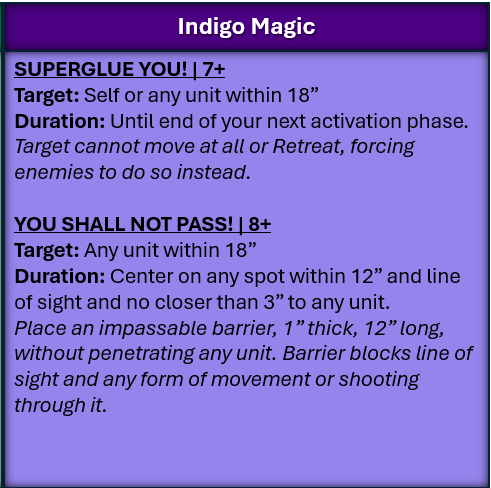
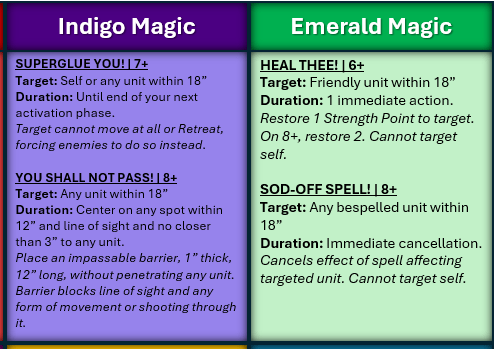
You’ll find two types of magic school cards. One is a full sized 3.5 x 5″ card. The other is a standard card game sized card. The standard card is pretty small font (8 pt) to fit, so I made both–print based on your eyesight. These are just reference cards for convenience during the game, though I suppose you could also use them to randomize spells for a fun scenario.
I’ve included both a printable PDF and the original PowerPoint file for convenience.
List Builder Data Breakdown
This section goes over how to edit the data for the list builder. This will let you tweak statlines, skill descriptions, or even what skills are available to what units. You DO NOT need to read this at all to use the builder. It’s only useful if you want to edit the data yourself.
Let’s start with the overview of the Data tab:
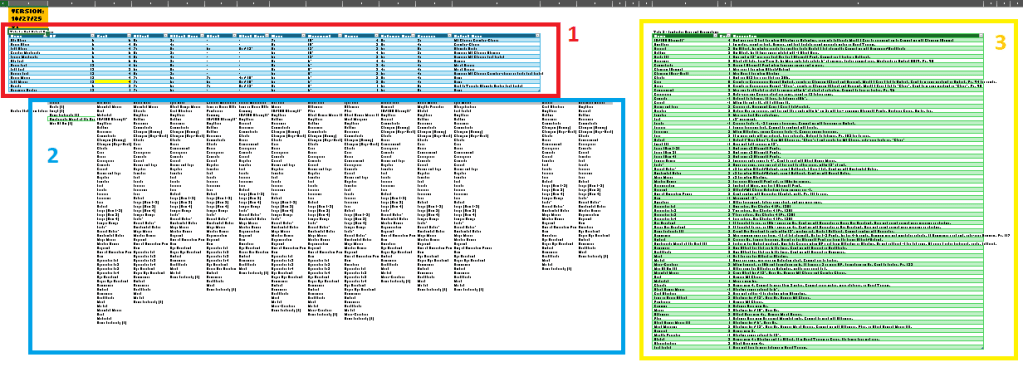
- Area 1 (Red box, blue table) is the unit statlines. All you have to do is edit it here and it will appear accordingly.
- Area 2 (Blue box, no/white table) is the options per unit type. It’s a long list.
- Area 3 (Yellow box, green table) is all the game skills and their descriptions. Edit descriptions here to edit what you see in the calculator.
Now, a closer look:
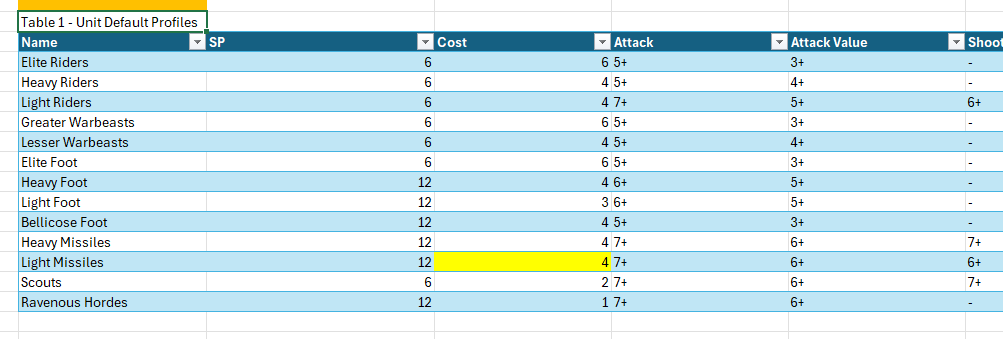
Unit Profiles is what it says on the tin. This is where the calculator reads your unit stats from. It pulls the list of units from this table (by referencing the table, so you could add more just below) and then uses a vlookup to look across the table to the appropriate column. To edit a stat or add a new default skill or change a point value, just edit the table. DO NOT change the Unit Names (e.g. “Light Foot”). It will break a giant if/then statement you don’t want to break. I assure you. This is the one edit I’d consider really ‘off limits.’ It’s not worth the trouble. This also means it’s fairly difficult to add whole new units to the builder. Another limitation, I’m afraid.
You’ll notice I highlighted Light Missiles points value–this is for an example. If I want Light Missiles to be 3 points instead of 4, I would just edit that highlighted box to ‘3.’ Done. You may have to reselect the unit in the Calculator tab to make it update, but it should update just fine.
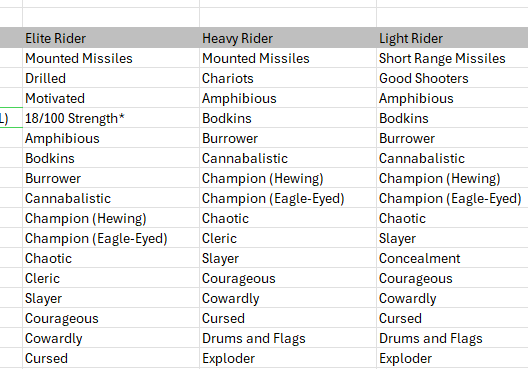
These lists feed the dropdown options for your unit skills on the Calculator. It will display in the exact order of this list. At the top are the unit’s profile skill options, then it goes into fantastical skills. This list reads down to Row 75 (more on that below). To add more skills, just add them below these lists in the same column. So, for instance, if I want my Light Riders to be capable of being Drilled, I just go to their list and add it onto the bottom. Done.
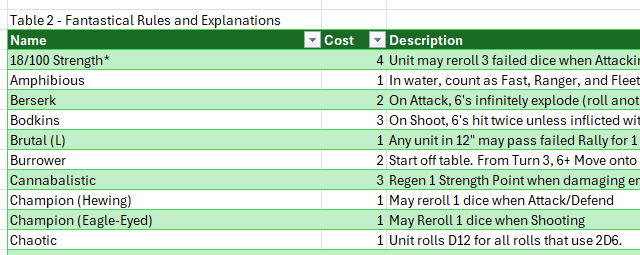
The final area goes over both fantastical and unit profile options (forgive the misnaming in the Excel–I’m lazy). This is simple: it lists the name, then the cost, then the description. The cost is used for calculations, so if you want to change the cost of Chaotic from 1 to -1, you just edit the line. Done. If you dislike my descriptions or want to tweak the skill’s text, do that in the “Description” column. Again, this is meant to be easy. This is a proper Table and is referenced as such in formulas. All you have to do is add a new line to the table at the bottom (which should integrate into the table automatically) and you’ll have created a new skill. Then you’ll want to add the skill to a unit in Area 2. Make sure your spelling matches!
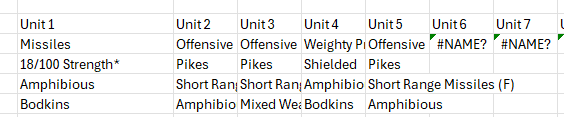

THIS TAB IS HIDDEN. I repeat: it’s hidden! Just right click any tab and select “Unhide” to find it. It’s a messy, terrible, necessary tab. Here’s a snapshot of what it does:

Yeah, it’s a terrible if/then statement that is 12 parts long, wrapped in an IFNA to prevent errors. Okay, the ONLY REASONS you need to know about this:
- It looks at the selected Unit Type on the calculator, then checks if it is one of the various unit types, which I typed in manually. It then references the appropriate column in Area 2 of the Data tab. Note how here it is looking at D20:D75. If you added enough skills to Elite Riders to go below row 75, you’d have to come here and edit it in the formula… across all 18 formulas. You can’t copy and paste it across cells. You’ll have to edit each individually. I’m sorry.
- This is how it populates your unit skill options for the drop down box on the Calculator tab. It reads them right out of here, so again you may have to edit that Data Validation to fix if you’ve somehow added a ton of options.
Conclusion
Okay, we’ve done it! A full release of tools with a reasonable level of “How does this Excel work” thrown in for good measure. I hope folks find these useful–it’s made list building in this game far more accessible for me as a person. I was going to make pretty unit cards but the process of building and rebuilding cards really grows thin after a while. This is far more streamlined, looks decent, and works well. I already have dwarf, elven, rat, lizardman, and frozen demon lists saved.
I may revisit this to build a similar builder for Xenos Rampant. I have the same problem there: a ton of options and difficulty remembering what they do. Honestly, I’d hope in the future Osprey can consider releasing official unit builders. It’s so helpful and makes an easy-to-learn game far more accessible.
As for my impressions of Dragon Rampant 2e, they’re coming. The short version is simple, if cheeky:
It’s Dragon Rampant. It quacks like a Dragon Rampant. It waddles like a Dragon Rampant. It’s Dragon Rampant.




Leave a comment